Design.com vs Looka (2026): Which AI Logo Generator Is Better for Startups?
Design.com vs Looka: Compare real wordmark logo samples, typography, AI editing, pricing, and branding tools to find the best logo generator in 2026.
Creating a logo for a startup is relatively easy with AI. Finding one that looks professional, communicates credibility, and works across different business materials is another challenge.
For consultants, freelancers, and founders building personal brands, the challenge is even more specific. Their names are often the brand itself, meaning typography, spacing, and readability matter more than elaborate symbols.
We found that Design.com is the better overall AI logo generator for startups and personal brands. It produced a wider selection of professional wordmarks with varied typography, while its conversational AI editing made customization more accessible. Looka is a reasonable alternative for founders who prefer a guided design process and one-time logo purchases.
Here’s what we did.
Design.com vs Looka: At a Glance
| Feature | Design.com | Looka |
|---|---|---|
| Logo creation approach | Hybrid AI generation and professional templates | Guided AI logo generation |
| Initial logo concepts | 10,000+ | 23, with option to load more |
| Typography variety | Broad selection of serif and sans-serif styles | Mostly simple wordmarks and icon combinations |
| AI editing | Conversational editing | Guided/manual adjustments |
| Free finished logo downloads | Selected designs | Generally unavailable |
| Vector formats | SVG, EPS, PDF | Available with Premium package |
| Additional branding tools | 50+ tools | Brand Kit |
| Best for | Professional logos and complete branding | Guided logo creation |
The Design Brief
We used the same creative brief for both platforms.
Business name: Alexandra Morgan
Industry: Business consulting
Logo type: Minimalist wordmark
Test prompt:
“Generate a professional, minimalist wordmark logo for a business consultant named Alexandra Morgan. Focus on elegant typography, clean letterforms, balanced spacing, and a sophisticated layout. Use navy blue, charcoal, cream, and muted gold.”
The objective was to create a name-focused logo suitable for a consulting website, LinkedIn profile, business cards, and client presentations.
We examined the generated concepts for typography, readability, visual balance, color consistency, and professional suitability.
Pricing, downloadable formats, and branding features are compared separately using product specifications rather than completed purchase tests.
Round 1: Which Platform Creates Better Wordmark Logos?
Design.com
Design.com produced more than 10,000 logo options, according to the test notes.
The results included a broad range of typography styles, from elegant serif wordmarks to clean sans-serif designs and more contemporary letter arrangements.
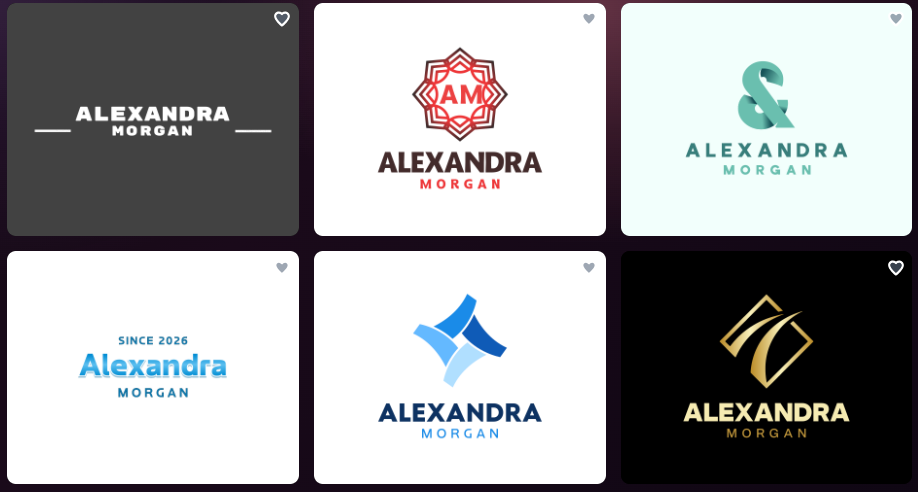
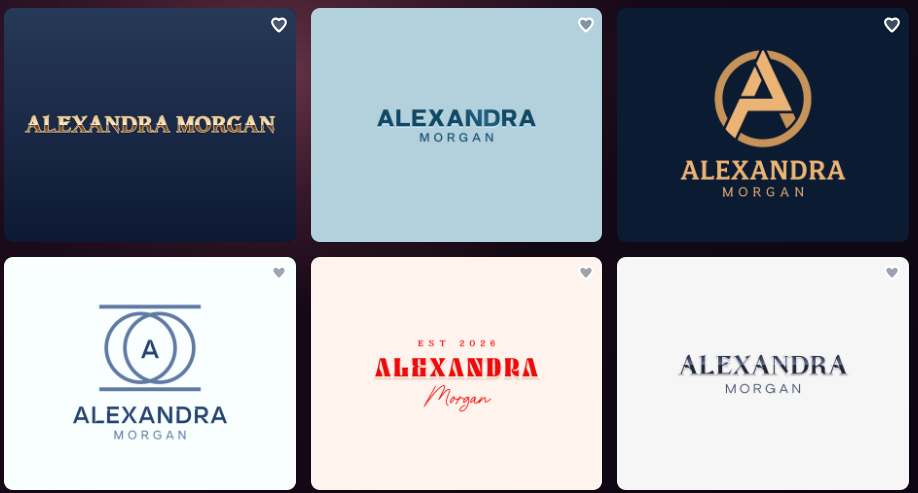
Several concepts presented Alexandra Morgan’s name without unnecessary decoration. Others incorporated monograms or geometric symbols alongside the typography.
The variety was useful because different consulting businesses require different brand personalities.
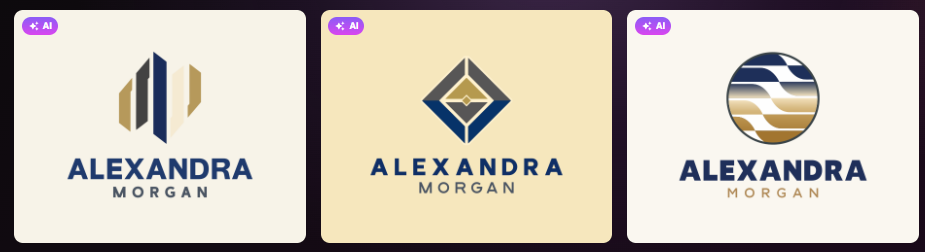
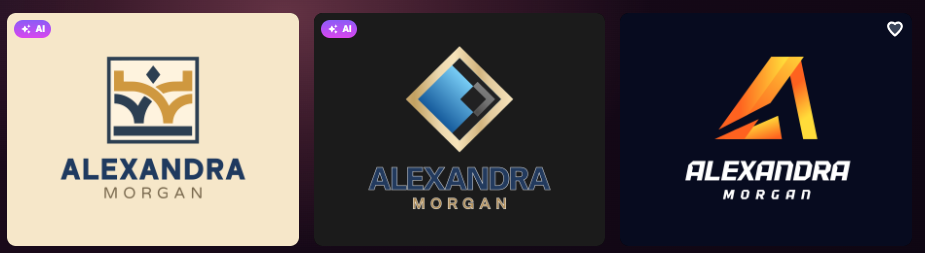
An established strategy consultant might prefer a restrained serif wordmark. A younger consultancy could choose a modern sans-serif design, while a more premium advisory business might favor muted gold lettering against navy blue.
The strongest examples used balanced spacing and clear visual hierarchy, making the consultant’s name easy to recognize.
Importantly, the logos showed no jumbled text. Most designs were market-ready, requiring little or no editing before use.
That is a significant advantage for founders who don’t have extensive design experience.
Design.com’s logo maker combines original AI-generated logos with professionally created templates, providing access to more than 500,000 logo designs.
One limitation is that not every generated concept was a pure wordmark. Some emphasized decorative symbols or monograms, meaning users still need to select designs that match the typography-first brief.
Looka
Looka generated 23 initial concepts, with an option to load more.
The results were mostly minimalist, featuring simple typography accompanied by small symbols.
Some designs used elegant lettering, but others appeared generic or lacked enough distinction to establish a recognizable personal brand.
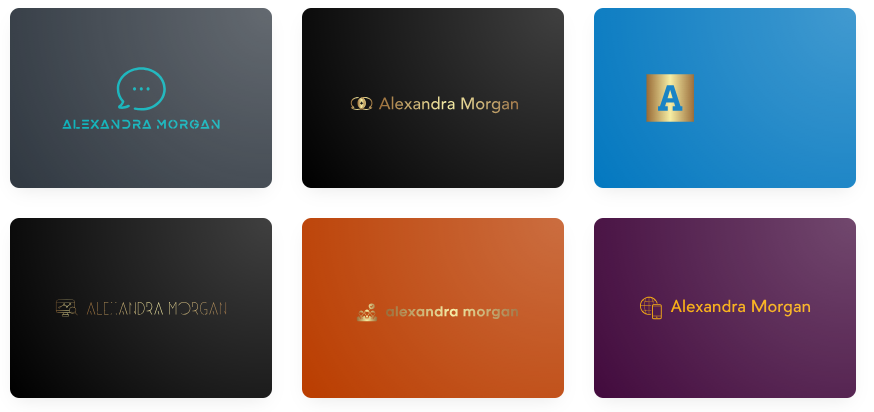
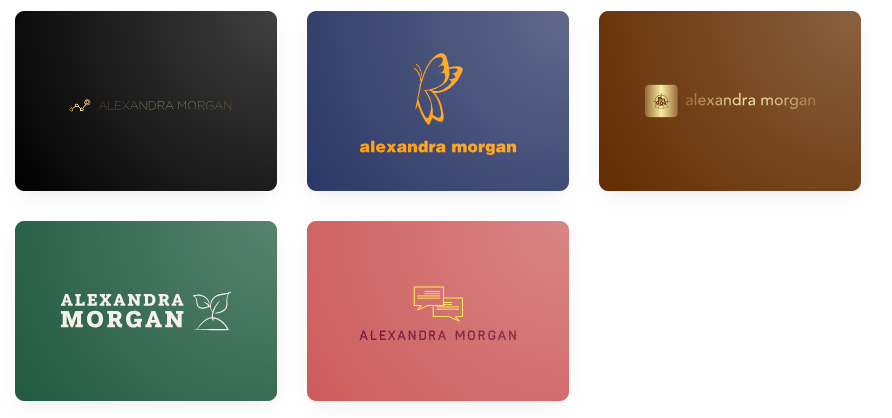
The test also revealed issues with color combinations. Several examples used low-contrast text against colored backgrounds, making the consultant’s name difficult to read.
Since readability is particularly important for wordmarks, those designs would require further adjustments.
Round 1 winner: Design.com. Its wider typography selection, readable text, and polished layouts produced stronger starting points for Alexandra Morgan’s personal brand.
Round 2: Which AI Logo Maker Offers Better Customization?
Even a professional-looking wordmark may need adjustments before becoming a permanent brand identity.
For Alexandra Morgan, that could mean changing colors, modifying letter spacing, or simplifying an accompanying symbol.
Design.com
Design.com’s AI logo generator includes conversational AI editing, allowing users to request changes using everyday language.
In the image below, the editor was asked to change a logo’s icon colors to red and dark blue.
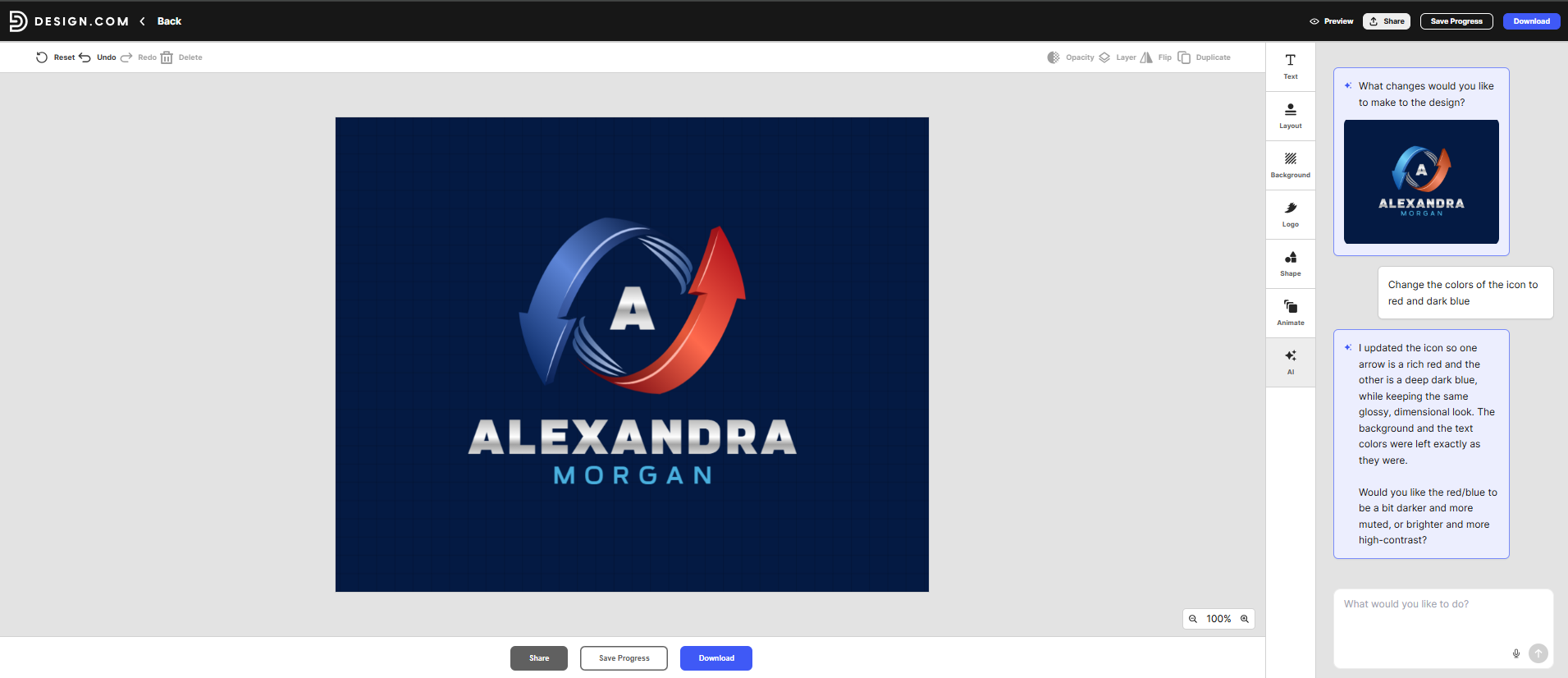
The example demonstrated how users could request a visual adjustment without manually navigating individual design settings.
This approach is useful for beginners who know what they want but lack the technical vocabulary of a professional designer.
Users can also modify typography, colors, refine letter spacing, and layouts through the visual editor.
Looka
Looka offers structured editing controls for fonts, colors, symbols, and layouts.
However, the tested workflow required users to make adjustments through the available controls rather than plain-language AI instructions.
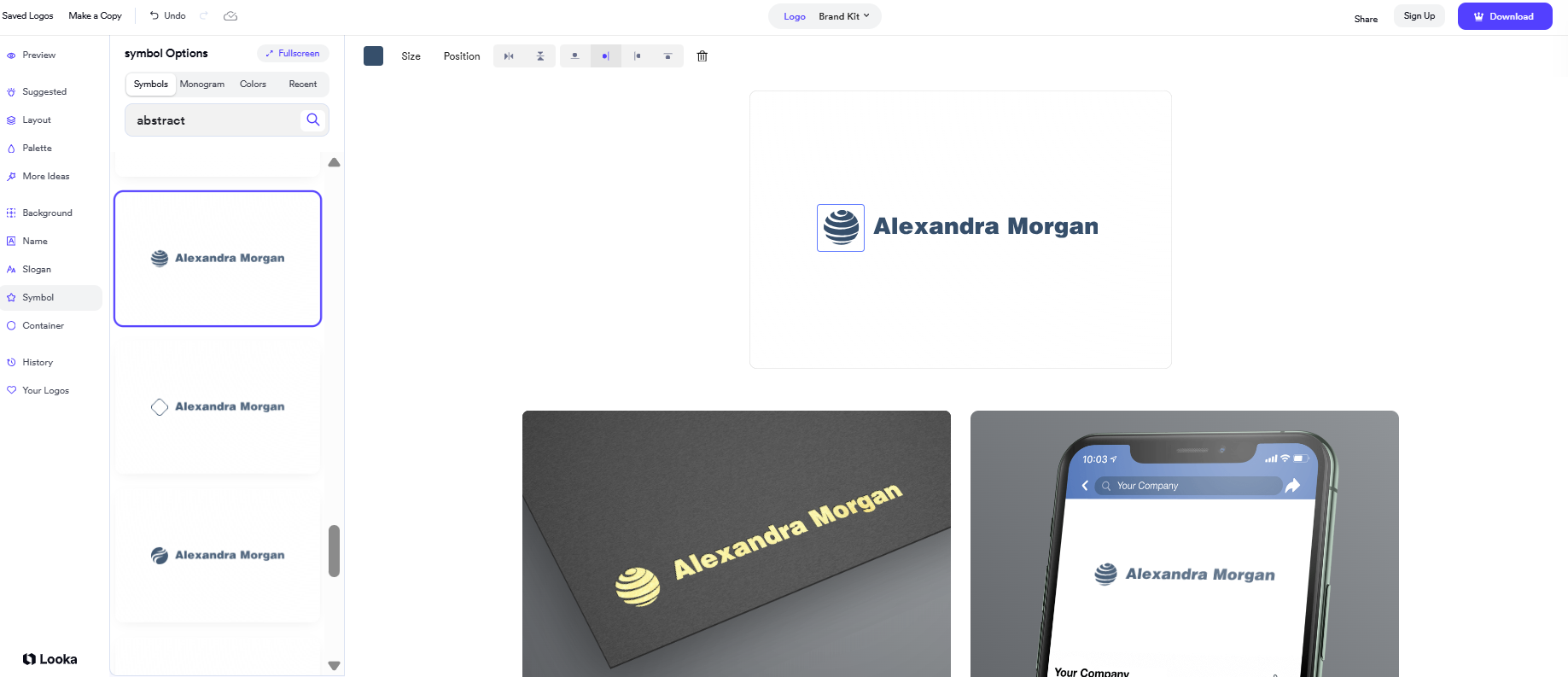
We also identified a symbol that appeared visually similar to a well-known telecommunications brand’s logo.
That resemblance does not establish trademark infringement, but it demonstrates why businesses should review generated symbols carefully before adopting them.
Round 2 winner: Design.com. Conversational editing provides a more accessible way for beginners to customize a logo without advanced design knowledge.
Round 3: Which Platform Offers Better Download Options?
A consultant’s logo must remain clear across websites, documents, presentation slides, and printed business cards.
That makes scalable vector formats particularly useful.
| Download Feature | Design.com | Looka |
|---|---|---|
| PNG | Available | Available |
| JPG | Available | Available |
| SVG | Available | Premium package |
| EPS | Available | Premium package |
| Available | Premium package | |
| Transparent background | Available | Eligible package |
| Free high-resolution/vector logos | Available | Generally unavailable |
Design.com offers selected free logos with high-resolution and vector downloads, including SVG files.
Looka allows users to generate and preview designs, but downloading professional logo packages generally requires payment.
Round 3 winner: Design.com. Its eligible free vector downloads provide more flexibility for startups working with limited budgets.
Round 4: Which Logo Maker Is Better for Personal Branding?
A wordmark is only one part of a consultant’s visual identity.
Alexandra Morgan also needs LinkedIn graphics, business cards, email signatures, presentations, and a professional website.
Design.com offers more than 50 additional design tools. Compatible templates can automatically inherit the logo’s colors, helping maintain consistency across different materials. This’ll make it easier for you to pair fonts across your branding needs as well.
Looka provides coordinated branding assets through its Brand Kit, including social media graphics and business cards.
Both platforms support branding beyond the initial logo, although their approaches differ.
Round 4 winner: Design.com. Its wider design ecosystem offers more flexibility for building a professional personal brand across different channels.
Round 5: Design.com vs Looka Pricing
| Pricing Feature | Design.com | Looka |
|---|---|---|
| Free logo creation | Yes | Yes |
| Free finished logo downloads | Selected designs | Generally no |
| Entry paid option | $3/month annually | $20 one-time |
| Vector downloads | Eligible free and paid designs | Premium package |
| Branding tools | Eligible subscriptions | Brand Kit subscription |
| Purchasing model | Free and subscriptions | One-time purchases and subscriptions |
Design.com Pricing
- Free: $0 (comes with free website builder, free digital business card, and free link-in-bio)
- Starter: $3/month annually or $9 monthly
- Value: $4/month annually or $14 monthly
- Premium: $5/month annually or $19 monthly
Looka Pricing
- Basic Logo Package: Approximately $20 one-time
- Premium Logo Package: Approximately $65 one-time
- Brand Kit: Separate subscription options
Looka’s one-time purchasing model can be attractive to users who only need a logo.
Design.com offers greater flexibility for businesses seeking free logo downloads and access to additional branding tools.
Round 5 winner: Design.com for overall value. Looka remains competitive for users who prefer purchasing a logo outright.
Who Should Choose Design.com?
Design.com is the stronger option for consultants, freelancers, and startups that want professional logos without extensive editing.
It is particularly suitable for businesses seeking diverse typography options, conversational AI editing, free vector downloads, and coordinated branding materials.
Its main limitation is advanced editing depth. Designers who require highly technical vector manipulation may prefer specialized illustration software.
Who Should Choose Looka?
Looka is worth considering for founders who prefer a structured logo creation process.
Its guided workflow helps users explore designs based on selected visual preferences, while its one-time purchasing options may appeal to those who only need a logo.
However, businesses prioritizing distinctive typography or extensive AI-assisted editing may find Design.com more suitable.
Final Scorecard: Design.com vs Looka
| Category | Winner | Reason |
|---|---|---|
| Wordmark variety | Design.com | Broader typography selection |
| Initial logo quality | Design.com | More polished, readable starting designs |
| AI customization | Design.com | Conversational editing |
| Download options | Design.com | Selected free vector logos |
| Complete personal branding | Design.com | 50+ additional design tools |
| Overall value | Design.com | Free options and integrated branding |
| Guided logo creation | Looka | Preference-based workflow |
| One-time logo purchases | Looka | Dedicated logo packages |
Overall winner: Design.com
Frequently Asked Questions
Is Design.com better than Looka for wordmark logos?
Design.com is the better choice based on the Alexandra Morgan test. It produced a wider selection of typography styles, with readable text and professional layouts that generally required minimal editing.
Which AI logo generator is best for personal branding?
Design.com is our recommendation for consultants and personal brands needing professional wordmarks, accessible customization, vector downloads, and matching marketing materials.
Can Design.com create a logo using only a person’s name?
Yes. Design.com supports typography-based logos using personal names and business names. Users can customize fonts, colors, spacing, and layouts to create a professional wordmark.
Is Design.com cheaper than Looka?
Design.com offers selected free logo downloads and paid plans starting at $3/month with annual billing. Looka offers one-time logo packages beginning at approximately $20. The better option depends on whether you need a single logo or ongoing branding tools.
Final Verdict
The Alexandra Morgan comparison highlights why typography matters when creating a personal brand.
Design.com produced a wider range of professional wordmarks, with readable lettering, balanced layouts, and multiple font styles. Looka offered a guided process, but several concepts required additional editing to improve readability and distinctiveness.
Design.com is the better overall AI logo generator for startups and personal brands in 2026. Its combination of professional templates, AI-generated designs, conversational editing, eligible free vector downloads, and integrated branding tools makes it a more complete option for consultants and entrepreneurs who want to establish a credible visual identity.